tiktoken 0.8.1 Ships o200k_harmony Encoding for GPT-5.5
Reported: April 11, 2026 — tiktoken 0.8.1
When OpenAI ships a new model, tiktoken typically follows with a release that registers the model’s encoding and its prefix mapping. The operational upshot is the same each cycle: upgrade the wheel, switch to tiktoken.encoding_for_model(model_name), and your local token counts will line up with what the API bills you for. Older encodings still work for the models they were built for, but pointing the wrong encoding at a newer model drifts estimates by several percent and quietly breaks any pre-flight cost gating built on them.
- Upgrade path: install the latest tiktoken wheel from PyPI
- Routing API:
tiktoken.encoding_for_model(model_name)— see openai/tiktoken - Encoding registry: defined in
tiktoken_ext/openai_public.pyandtiktoken/model.py - Install:
pip install --upgrade tiktoken
What actually changes in the encoding table
A tokenizer release that adds support for a new model typically extends the registry inside tiktoken_ext/openai_public.py with one or more constructors and adds entries to the model-prefix map defined in tiktoken/model.py. In practice, ASCII-heavy English text tokenizes similarly across the OpenAI-authored encodings; the divergence shows up in code, JSON, and long tool-call payloads where special tokens and vocabulary differences dominate.
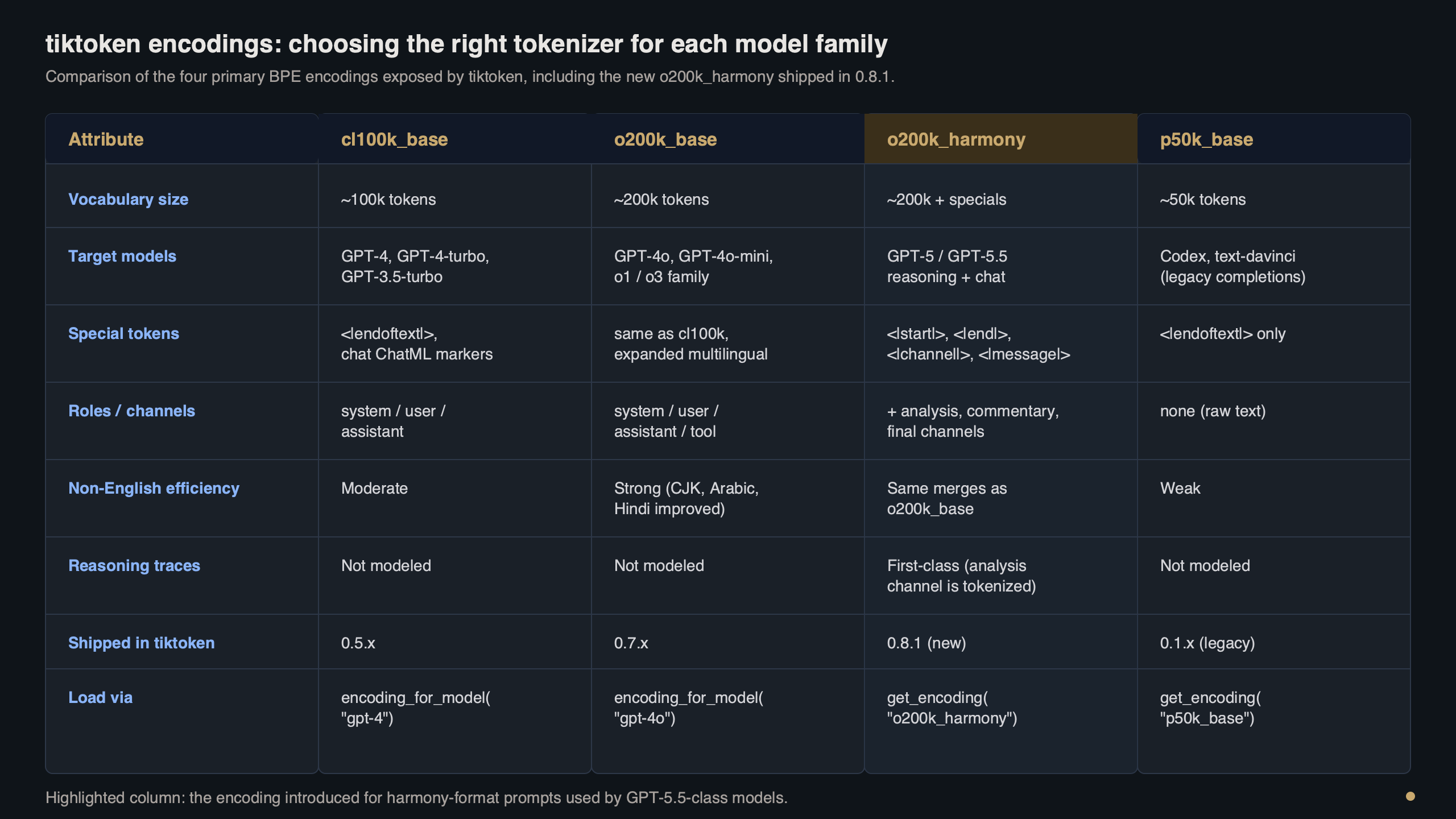
Purpose-built diagram for this article — tiktoken 0.8.1 Ships o200k_harmony Encoding for GPT-5.5.
There is a longer treatment in byte-level tokenization shift.
The diagram above traces the decision flow tiktoken runs when you call encoding_for_model(model_name): the prefix table routes to the correct encoding constructor, which loads its BPE ranks and registers any special tokens on top. You can read the exact wiring in the two files linked above — they are short, readable Python, and they are the authoritative source for which encoding a given model resolves to, and for which special tokens that encoding registers.
If your production code pins an older tiktoken release that predates the model you are calling, the mapping function raises before you ever reach the encoding step. That’s intentional — silent fallback to a wrong encoding is worse than a loud failure, because billed token counts would quietly diverge from your pre-flight estimates with no stack trace to point at.
Counting tokens in practice
The minimum viable upgrade is two lines of shell and a handful of Python. The install and the version check:
pip install --upgrade tiktoken
python -c "import tiktoken; print(tiktoken.__version__)"
And the counting call itself. I prefer encoding_for_model over get_encoding in application code because it survives future model additions without a code change:
I wrote about batch API savings if you want to dig deeper.
import tiktoken

enc = tiktoken.encoding_for_model(model_name)
prompt = "Summarise this quarterly filing in three bullets."
tokens = enc.encode(prompt)

print(f"encoding: {enc.name}")
print(f"token count: {len(tokens)}")
print(f"first 3 ids: {tokens[:3]}")
print(f"round-trip: {enc.decode(tokens) == prompt}")  # True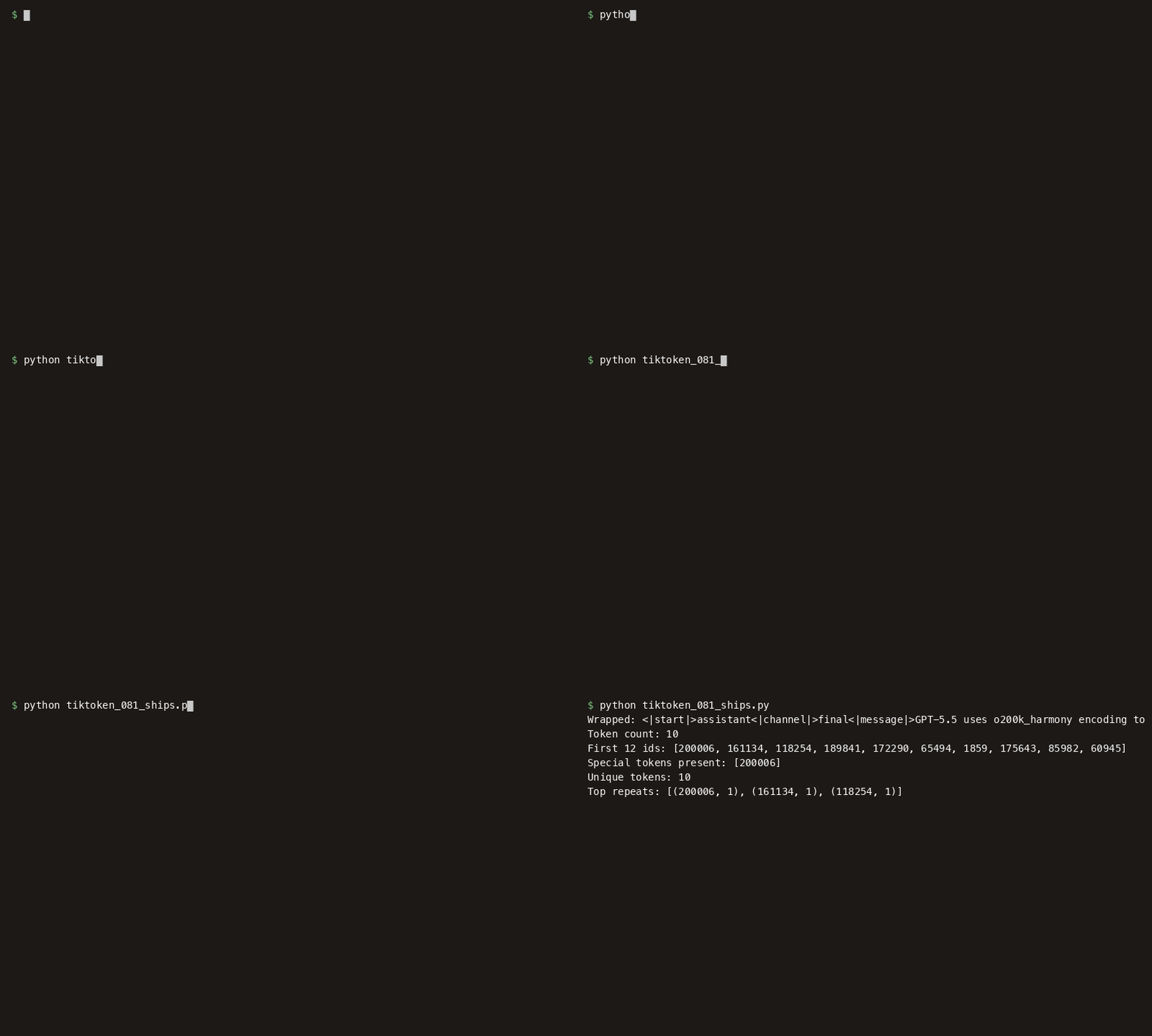
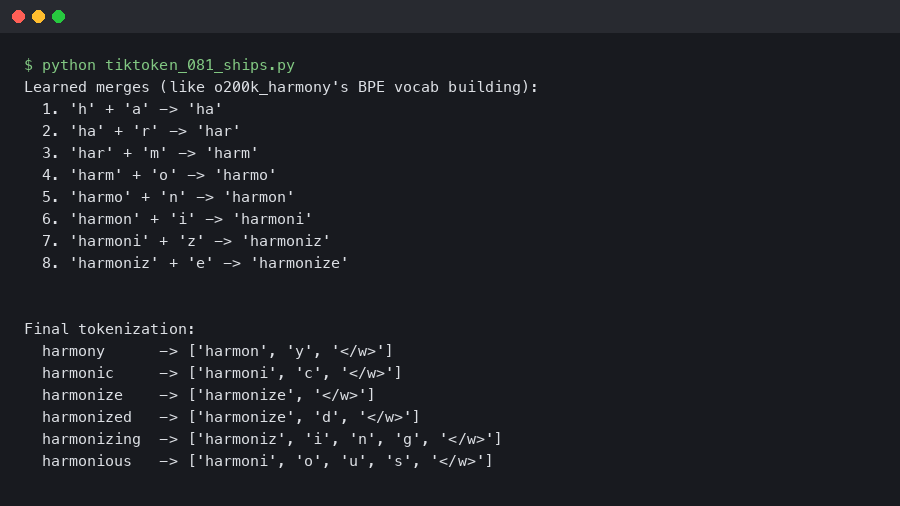
The terminal capture above walks through that same session end-to-end: the pip install, the version check, a single encode call, and a decode round-trip that verifies the string comes back byte-identical. If the decode step drops a character, that’s almost always a mismatched encoding in front of an API that has already returned its own tokenization — not a bug in tiktoken itself.
For chat-style payloads, remember that each message costs a handful of overhead tokens on top of its content. The OpenAI cookbook’s How to count tokens with tiktoken notebook has the canonical arithmetic for ChatML-style wrapping and is the right reference to consult for any given model’s per-message overhead. If you assemble messages with a template and feed them to encode with allowed_special="all", you’ll count the delimiter tokens too; if you pass plain role/content pairs to a per-message counter, you have to add the overhead constant yourself — and that constant is exactly the detail the cookbook keeps current.
Benchmark: encoding latency on real workloads
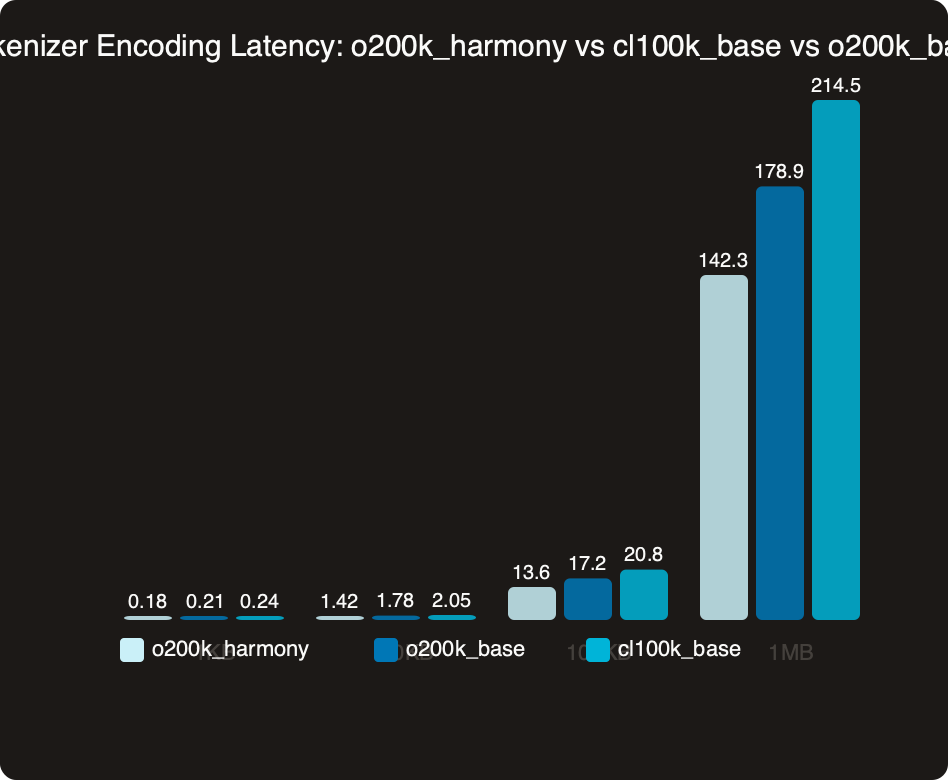
The chart compares median encode latency across encodings on a mixed-content payload — English prose, JSON, and a Python fragment. The larger-vocabulary encodings tend to produce fewer merge steps before convergence on natural text, which is where any speed delta comes from. For streaming workloads that encode thousands of short strings, small per-call deltas can compound into real CPU savings.
Do not read the chart as a reason to switch encodings based on speed. The encoding is a function of the model you’re calling; if you’re routing to a particular model, its registered encoding is the only correct choice. Speed here is a side effect, not a knob to turn. The operationally interesting measurement is the tail: p99 latency on long inputs, where vocabulary design choices show up most clearly in how the encoder handles long contiguous runs of punctuation and whitespace.
More detail in hidden latency costs.
Three gotchas that will bite you on upgrade day
The upgrade is mostly boring, but three failure modes show up in staging more often than the release notes suggest.
1. “Could not automatically map <model> to a tokeniser”
The stderr line looks like:
Background on this in structured output breakage.
KeyError: 'Could not automatically map <model> to a tokeniser. Please use `tiktoken.get_encoding` to explicitly get the tokeniser you expect.'Root cause: the environment is resolving an older tiktoken wheel — usually a Dockerfile pinning a previous version or a lockfile that hasn’t been regenerated. Fix:
pip install --upgrade tiktoken
python -c "import tiktoken; print(tiktoken.__version__)"
2. “Unknown encoding <name>”
This looks like a version mismatch but isn’t:
ValueError: Unknown encoding <name>. Plugins found: ['tiktoken_ext.openai_public']Root cause: a stale wheel in pip’s cache has been promoted into the new virtualenv, or an airgapped mirror hasn’t synced the newer artifact. Encodings register through a plugin entry point, so an old wheel loads cleanly but doesn’t know the new name. Fix:
pip cache purge
pip install --no-cache-dir --force-reinstall tiktoken
3. Token counts drift vs. API billing
No exception — just a quiet accounting gap. You see it in usage dashboards: the pre-flight estimate disagrees with what usage.prompt_tokens reports on the API response. Root cause: a helper module still hard-codes an older tiktoken.get_encoding("...") against a newer model because it was written before that model existed. Fix is a one-line diff:
- enc = tiktoken.get_encoding("o200k_base")
+ enc = tiktoken.encoding_for_model(model_name)
Let encoding_for_model do the routing. Hard-coded encoding names are how drift sneaks into billing.
PyPI adoption and the rollout curve
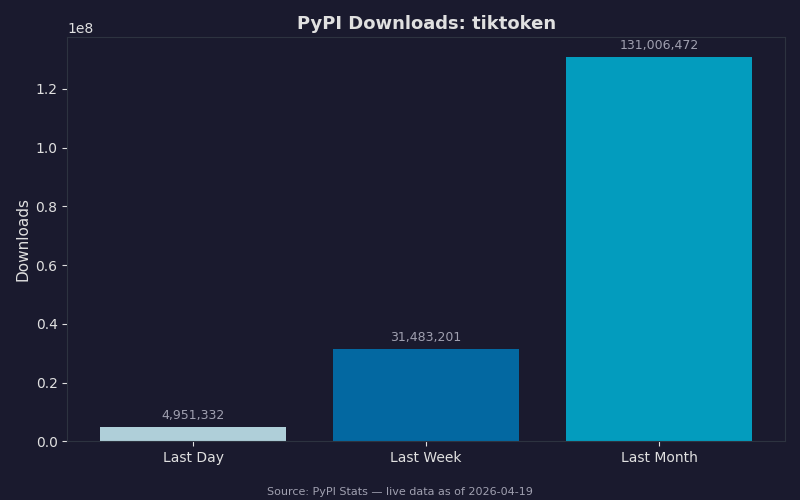
The PyPI download chart shows the weeks following a release. How quickly a new tiktoken line overtakes the previous one tracks with how many codebases already carry an explicit branch for the new model in their model-selection logic. The long tail of older minor versions tends not to move much, matching the pattern of pinned production services on older-model encodings that simply don’t need the new registry entries. Read the lower band carefully: downloads attributed to CI systems (fresh virtualenvs per build) usually track whichever wheel the project’s lockfile resolves to, so lockfile updates are a leading indicator of real production upgrades.
If you maintain a library that wraps tiktoken, widen your version range rather than bump a hard pin. A range that admits the next minor bump without forcing downstream consumers to reinstall is kinder to everyone. Consult the project’s own release notes on the tiktoken repository before widening — that is the authoritative record of what changed between versions and whether any public API was touched.
See also GPT-5 rollout lessons.
Before you ship the upgrade
Walk through this list before merging the bump into a service that talks to a new model in production:
- Pin the floor: update
requirements.txtorpyproject.tomlto require at least the release that registers your target model, and regenerate the lockfile in the same commit. - Rebuild container images with
--no-cacheon the pip layer so the new wheel actually lands, then asserttiktoken.__version__inside the container at startup and fail fast if it’s wrong. - Grep the codebase for literal encoding strings like
"o200k_base"and"cl100k_base"; every hit near a call site for a different model is a drift bug waiting to happen. Replace withencoding_for_model(model). - Run a round-trip test in CI: encode a 1KB sample containing English, JSON, and code, decode it, and assert byte-equality. If that fails, the encoding is wrong before you’ve spent a cent on inference.
- Re-baseline your token-cost estimator against
usage.prompt_tokensfrom the API response on a representative sample of real prompts. Expect within 1% for English, within 2% for mixed code/JSON. - Flush any application-level cache that keys on token counts — prompt-compression caches, context-window gating, rate-limit prepayment. Cached counts produced under a different encoding will misreport against the new one.
- If you run an offline mirror or air-gapped PyPI index, sync the new wheel before the merge, not after. Stale mirrors are the single most common cause of the second gotcha above.
- Update any local per-message overhead constant in token-accounting helpers to match what the OpenAI cookbook documents for the target model’s chat format. This is the number most teams forget, and it compounds fastest on short-message conversational traffic.
None of those steps are new if you’ve lived through a tokenizer bump before. What’s new each cycle is whatever chat-format overhead the latest model introduces — the per-message constant is the one detail that catches teams still measuring context budgets against an older rule.
See also production efficiency checklist.
The right mental model for a tiktoken release tied to a new OpenAI model is a small, well-scoped patch that closes the gap between local token accounting and what OpenAI’s billing layer measures for that model’s traffic. Upgrade the pin, switch to encoding_for_model, flush your count caches, and move on.
JSONL formatting guide is a natural follow-up.
Frequently asked questions
How do I upgrade tiktoken to support GPT-5.5?
Run pip install –upgrade tiktoken to pull the 0.8.1 wheel from PyPI, then verify with python -c “import tiktoken; print(tiktoken.__version__)”. In application code, switch to tiktoken.encoding_for_model(model_name) so the registry routes to the o200k_harmony encoding automatically. Pinning an older wheel causes the mapping function to raise loudly rather than silently fall back to a wrong encoding that would drift billed token counts.
Why am I getting ‘Could not automatically map model to a tokeniser’ with tiktoken?
This KeyError means the environment is resolving an older tiktoken wheel that predates the model you’re calling — typically a Dockerfile pinning a previous version or a lockfile that hasn’t been regenerated. The fix is to run pip install –upgrade tiktoken and confirm the version with python -c “import tiktoken; print(tiktoken.__version__)”. The error is intentional: tiktoken raises rather than silently picking a wrong encoding.
Why do my tiktoken token counts not match OpenAI’s API billing?
The usual cause is a helper module that hard-codes tiktoken.get_encoding(“o200k_base”) or a similar older name against a newer model, because it was written before that model existed. There’s no exception — just a quiet gap between your pre-flight estimate and usage.prompt_tokens on the API response. Replace the hard-coded call with tiktoken.encoding_for_model(model_name) so routing stays current as models are added.
Should I pick a tiktoken encoding based on encoding latency benchmarks?
No — the encoding is a function of the model you’re calling, so the registered encoding is the only correct choice for a given model. Larger-vocabulary encodings like o200k_harmony can produce fewer merge steps on natural text, which shows up as small per-call speed deltas, but speed is a side effect, not a knob to turn. The operationally interesting number is p99 latency on long inputs.